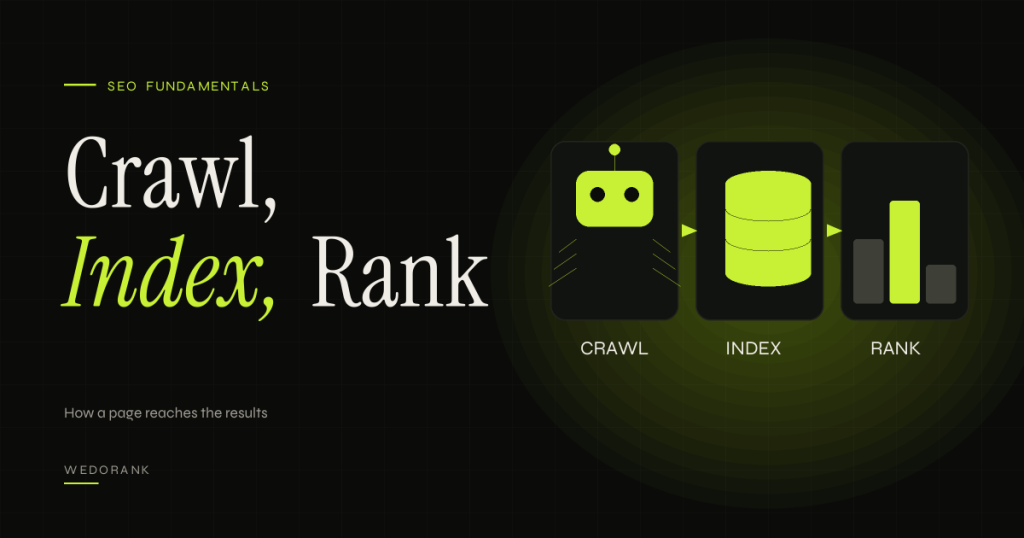
Every conversation about SEO rests on three verbs: crawl, index and rank. Pages that are not crawled cannot be indexed. Pages that are not indexed cannot rank. Pages that rank poorly may be perfectly fine, or may have a problem at one of the earlier stages that nobody noticed. Understanding the pipeline lets you diagnose problems in the right order instead of guessing, and it is the foundation for everything else in technical SEO and for the newer questions about how AI search tools find and use your content.
This guide explains how search engines discover pages, fetch and process them, decide what to store and decide what to show, using Google’s own description as the main reference. It then shows you how to check each stage on your own site with free tools, how to troubleshoot problems stage by stage and how to run a small experiment on how quickly new pages are indexed. It avoids folklore about “the algorithm”, because most of the useful knowledge is about the process and not about secret ingredients.
Key takeaways
- Google describes three stages: crawling (finding and fetching pages), indexing (processing and storing them) and serving results (choosing what to show for a query). Not every page makes it through every stage.
- Problems are easiest to fix when you identify the stage at which a page fails. A page that is crawled but not indexed needs different help from one that is indexed but ranks poorly.
- You can influence discovery with internal links and sitemaps, access with robots rules and server health, and indexing with unique, useful content and clear canonical signals.
- Ranking is the outcome of many systems. No single factor controls it, and no one outside the search engine knows the full recipe.
- AI search tools add their own retrieval steps, but they depend on the same foundation: if your pages cannot be fetched and understood, they cannot be used.
How to read the evidence in this guide
The three-stage description is official documentation from Google Search Central. Details of how crawling is scheduled, how duplicates are chosen and how ranking systems weigh signals are only partly documented, so where we describe them we say so. Troubleshooting sequences are practitioner conventions.
What Are Crawling, Indexing and Ranking?
Crawling
Crawling is the process by which a search engine’s automated programs, often called crawlers or bots, discover and fetch pages. Google’s main crawler is called Googlebot. It finds pages by following links from pages it already knows and by reading sitemaps that site owners submit. It fetches each URL and downloads the content, subject to rules such as robots.txt and the capacity of the server. (Official documentation.)
Indexing
Indexing is the stage in which the search engine processes a fetched page, works out what it contains and stores information about it in a large database called the index. Processing can include rendering the page the way a browser would, so that content generated by JavaScript is visible. During indexing the system also decides which URL to treat as the main version when it finds duplicates. A page may be crawled and still not be indexed. (Official documentation.)
Serving and ranking
When someone searches, the engine looks in the index for relevant pages and orders them using ranking systems that take many signals into account, such as relevance to the query, the quality and reliability of the content and the context of the search, including location and language. Google documents its major ranking systems on a dedicated page, and states that no single factor is the whole story. (Official documentation: A guide to Google Search ranking systems.)
Where AI answers fit
AI-generated answers are produced after retrieval from the same kind of underlying index, often with additional retrieval steps. Google says that to be a supporting link in AI Overviews or AI Mode a page must be indexed and eligible to be shown in Search with a snippet. So the pipeline in this article is still the gateway. See our glossary entry on AI Overviews.
Who should care
Everyone who publishes on the web. If you are new to SEO, this is the model to learn first. If you are experienced, it is the checklist you return to when something strange happens, such as a page that will not appear or a traffic drop with no obvious cause.
How the Pipeline Works
- Discovery. A URL becomes known through a link from another page, a sitemap entry or another route. Pages without links are hard to find.
- Crawl scheduling. The engine decides whether and when to fetch the URL, taking into account the site’s perceived importance, how often content changes and how much load the server can handle.
- Fetching. The crawler requests the page. The server’s response code matters: a 200 means success, a 301 or 302 means a redirect, a 404 means not found and a 5xx means a server problem.
- Rendering. For pages that rely on JavaScript, the engine may need to run the scripts to see the content, which can introduce a delay.
- Processing and canonical selection. The engine analyses the content, links, language and signals, and decides which of several similar URLs to treat as the canonical.
- Index decision. The engine decides whether to store the page. Duplicates, thin or low-value pages and pages blocked by directives may be left out.
- Serving. When a query arrives, ranking systems select and order results from the index.
| Stage | What decides success | Common failure | How to check |
|---|---|---|---|
| Discovery | Internal links, sitemaps, external links | Orphan pages with no links | Crawler export, sitemap report |
| Fetching | Server health, robots rules, status codes | Blocked by robots, 5xx errors, slow responses | Crawl stats, URL Inspection, server logs |
| Rendering | Content available in HTML or after scripts | Key content only loaded by blocked scripts | URL Inspection live test, rendered HTML |
| Indexing | Unique, valuable content; canonical signals; directives | Duplicates, noindex, thin pages | Page indexing report |
| Serving | Relevance, quality and context | Poor match to intent, weak content, strong competitors | Performance report, live results |
Crawl budget: when it matters
Crawl budget is the number of URLs a search engine is willing and able to fetch from your site in a given period. Google has said it mainly matters for very large sites or sites whose content changes extremely often, and that most sites do not need to worry about it. (Official documentation: Optimize your crawl budget, which says the guide mainly applies to sites with 1 million or more unique pages that change weekly, or 10,000 or more unique pages that change daily.) For smaller sites, slow indexing is more often a quality, linking or technical access issue than a budget problem.
Common myths
- “Submitting a sitemap guarantees indexing.” A sitemap helps discovery. It does not force indexing.
- “If it is crawled it will be indexed.” Many crawled pages are not indexed because they duplicate other content or add little value.
- “Robots.txt removes pages from search.” It controls crawling, not indexing. A blocked URL can still appear if other pages link to it.
- “Ranking is one algorithm with a secret list.” It is many systems working together, and the details are not published.
- “More pages mean more traffic.” Pages that add nothing can be left out of the index and can dilute attention from the ones that matter.
A Real-World Example
This example is illustrative. It follows an invented page through the stages. We deliberately give no timings because they vary widely.
A consultancy publishes a new guide at a new URL. What happens depends on the choices made on the site:
- Discovery: the guide is linked from the blog index and from two related articles, and is listed in the sitemap. Crawlers have three routes to find it.
- Fetching: the server returns a normal 200 response, robots.txt does not block the section and the page loads promptly.
- Rendering: the main text is in the HTML, so nothing depends on scripts.
- Processing: the page declares itself as its own canonical URL. There are no near-duplicates.
- Index decision: the content is substantial and distinct, so it is eligible.
- Serving: the page appears for some long-tail queries and, over time, earns impressions that Search Console reports.
Now imagine three small changes: the guide is not linked from anywhere, the sitemap is missing, and a leftover noindex tag sits in the template. The page might never be discovered, and if it were, it would be excluded. The content is identical and the outcome is completely different. That is the practical meaning of the pipeline: quality content can still fail at an early stage for reasons that have nothing to do with the writing.
Implementation Steps: Check Each Stage on Your Own Site
- Pick five representative pages: a top performer, a recent page, a page that never performed, a deep page and a page you expect to be excluded. This gives you a range of cases.
- Check discovery. Confirm each page is in the sitemap and linked from at least one indexable page. A crawler export shows the number of internal links to each URL.
- Check access. Request each URL in a browser and in a crawler and confirm the status code. Review your robots.txt for blocks affecting those URLs.
- Run URL Inspection in Search Console. It reports whether the URL is indexed, the last crawl date, the user-declared and Google-selected canonical and any directives found.
- Run the live test and view the rendered HTML and screenshot to confirm the content appears.
- Compare canonicals. If the Google-selected canonical differs from yours, investigate duplicates, redirects and conflicting signals.
- Check the page indexing report for patterns across the site, not just single URLs.
- Check performance data. For indexed pages, look at queries, impressions and positions in the Performance report to see whether the page is serving and for what.
- Record the stage at which each page fails, then apply the fix for that stage rather than rewriting content by default.
Troubleshooting by stage
| Symptom | Likely stage | First things to check |
|---|---|---|
| URL does not appear in Search Console at all | Discovery | Internal links, sitemap, accidental orphaning |
| “Discovered, currently not indexed” | Crawl scheduling | Site quality signals, internal links, server responsiveness |
| “Crawled, currently not indexed” | Index decision | Uniqueness and value of content, duplication, thin pages |
| Indexed but the wrong URL is chosen | Canonical selection | Canonical tags, redirects, parameter handling |
| Indexed but invisible for target queries | Serving | Intent match, content depth, competition, internal links |
| Content missing in the rendered view | Rendering | Blocked scripts, content loaded on interaction |
Reading Crawl Stats and Server Logs
Search Console’s crawl stats report and your server’s access logs show crawling from the crawler’s side. They are the closest thing you have to a direct view of stage two of the pipeline. (See the Crawl Stats report help.)
What to look for in crawl stats
- Total requests over time. A sudden drop can signal an access problem. A steady rise after you add content is a healthy sign.
- Response code breakdown. Mostly 200 responses is good. A large share of redirects, 404s or server errors means crawlers are spending effort on URLs that do not help you.
- Average response time. Slow responses can reduce how much a crawler fetches. Spikes often line up with traffic peaks or hosting problems.
- File types and purposes. Check that crawlers are mostly fetching pages you care about, and not endless parameter variants.
- Host status issues. Repeated problems with robots.txt access, DNS or server connectivity deserve immediate attention.
What to look for in server logs
Logs list every request to your server, including the URL, the time, the response code and the user agent. Filtering for known crawler user agents shows which URLs they actually request. Because user agents can be faked, verify important findings using the verification methods each search provider documents. The value of logs is that they show behaviour, not just what a tool reports about it:
- URLs that crawlers request often but that you do not care about, such as filtered or session URLs.
- Important URLs that crawlers rarely or never request.
- Patterns after a release, such as a spike in 404s from changed URL formats.
- Which AI-related crawlers are visiting, and what they fetch, if you have chosen to allow them.
Log analysis needs hosting access and some technical skill. For smaller sites, crawl stats and URL Inspection are usually enough.
A Note on JavaScript-Heavy Sites
Sites that build pages in the browser add a step to the pipeline. The crawler fetches the HTML, then the page may need to be rendered before the content and links appear. Google documents that it can render JavaScript, but rendering can be delayed or fail if resources are blocked or the scripts depend on user interaction. (Official documentation: JavaScript SEO basics.)
Practical checks: compare the raw HTML source with the rendered HTML in URL Inspection, make sure important links are real anchor links with URLs and confirm that primary content appears without requiring a click or scroll event. Server-rendered or pre-rendered content is easier for every crawler, including those that do not run scripts at all. This matters more now that several AI tools fetch pages without full rendering, although each provider documents its own behaviour and you should check it.
A One-Page Pipeline Diagnostic
Use this when a page is not performing and you do not know why. Work down the list and stop at the first failure.
- Is the URL linked internally from an indexable page? If not, fix discovery.
- Is it in the sitemap, and is the sitemap clean? If not, fix the sitemap.
- Does it return a 200 status and load for a crawler? If not, fix access.
- Does robots.txt or a meta directive block it? If unintended, remove the block.
- Does the rendered HTML contain the main content? If not, fix rendering.
- Does it canonicalise to itself, and does Google agree? If not, investigate duplicates.
- Is it indexed? If not, check the reason in the page indexing report and improve uniqueness and value.
- Does it appear for relevant queries? If not, review intent match, content depth and internal links.
- Do searchers click it when it appears? If not, review the title and description.
Writing the answer to each question next to the URL takes minutes and turns a vague complaint (“this page is not working”) into a precise diagnosis.
Free Tools
| Tool | Use | Limits and checks |
|---|---|---|
| Google Search Console | URL Inspection, page indexing, sitemaps, crawl stats and performance | Needs verified ownership; some reports lag by days |
| Free crawler (for example the free version of Screaming Frog) | Discovery, status codes, canonicals, internal link counts | Free versions limit the crawl size. Check current limits. |
| Browser developer tools | View source, rendered DOM and response headers | Requires some technical comfort |
| Bing Webmaster Tools | Another index’s view of your site | Reports differ from Google’s |
| Server access logs (if available) | See which crawlers fetch which URLs | Requires hosting access and analysis skills |
| An AI assistant such as Claude | Help interpret exports and draft a troubleshooting summary | Provide data only; verify its claims. Free usage limits apply. |
Limitations
- The internals are not public. The stages are documented. The exact decision rules are not, so any claim about a precise threshold should be treated as a hypothesis.
- Search Console reports lag and aggregate. You may see delays and sampled data.
- Not every page deserves indexing. Excluding low-value pages is normal and often desirable.
- Timelines vary. Pages are indexed within minutes on some sites and take much longer on others, depending on site signals.
- Requests do not guarantee outcomes. Asking for indexing in Search Console prompts a look at the page. It does not promise inclusion.
- Other engines differ. Bing and AI tools use their own crawlers and rules.
A Measurable Experiment
Hypothesis (unverified): New pages that are linked from a prominent hub page and included in the sitemap are discovered and indexed sooner than comparable new pages that are only in the sitemap.
- Prepare comparable pages. Create or schedule six to ten new pages of similar type, length and quality. Do not use filler.
- Split into two groups. Group A pages are linked from a hub page that is already crawled often and are included in the sitemap. Group B pages are included in the sitemap only.
- Publish at the same time and record the publication timestamp for each page.
- Check daily using URL Inspection (without requesting indexing, so you do not interfere) and note the first date each page shows as crawled and the first date as indexed.
- Compare the groups using the median time from publication to first crawl and to indexing, and the share indexed after 14 and 28 days.
- After the test, link Group B pages as you normally would.
Metrics: days to first crawl, days to indexed status, share indexed at fixed intervals. Guardrails: do not use pages that would be harmful if delayed, and do not publish low-quality pages for testing. Confounders: small sample, differences in page content, changes in site-wide crawl demand and reporting lags in the tool. Interpretation: a consistent difference supports a general rule you can use, such as always linking new pages from a hub on publication. With a small sample it is a pattern in your site, not a universal law.
Common Mistakes
- Fixing content when the problem is access. Rewriting a page that is blocked or orphaned wastes effort.
- Relying on the sitemap alone. Internal links are a strong discovery and importance signal.
- Using robots.txt to hide pages. Use the proper directives and access controls instead.
- Ignoring canonical conflicts. Mixed signals lead to unexpected URLs being chosen.
- Requesting indexing repeatedly. It does not speed things up and it hides the underlying issue.
- Assuming ranking is the only problem. Check that the page is indexed before analysing rankings.
Frequently Asked Questions
How long does it take for a new page to be indexed?
Google says that for most sites new pages take several days at a minimum to be noticed, and that most sites should not expect same-day crawling unless they are time-sensitive, such as news sites. It can be quicker on established, frequently crawled sites and slower on new or low-signal ones. Strong internal links and an updated sitemap help discovery, but there is no guaranteed timeline. (Official documentation: Optimize your crawl budget.)
What is the difference between crawling and indexing?
Crawling is fetching the page. Indexing is processing it and storing it so it can be shown. A page can be crawled without being indexed.
Why is my page crawled but not indexed?
Common reasons include duplication, thin or low-value content and conflicting canonical signals. Review the page against others on your site and improve its distinct value.
Do I need a sitemap?
It is not mandatory, but it helps discovery, especially for larger or newer sites. Make sure it lists only canonical, indexable URLs.
Does Google index every page it crawls?
No. It decides which pages are worth storing, and it excludes many duplicates and low-value URLs.
How do AI tools find my content?
Some rely on search indexes, and some use their own crawlers. Each provider documents its crawlers and controls. In all cases, accessible, clear pages are easier to use.
What is the first thing to check when traffic drops?
Confirm that key pages are still indexed and returning proper responses before analysing rankings or content.
Sources and Further Reading
- Google Search Central: How Google Search works
- Google Search Central: A guide to Google Search ranking systems
- Google Search Central: Optimize your crawl budget
- Google Search Central: AI features and your website
Related reading
- How to run a technical SEO audit with free tools
- Modern SEO in 2026
- Content clusters and internal linking
Next Step
If you want a clear diagnosis of where your important pages fail in the pipeline, request a free SEO audit. We will show you the stage, the evidence and the fix.